EdgeHub Archiver - Historical data calculation - 2.1.0
Changelog
| Version | Author | Update date | Comment |
|---|---|---|---|
| 2.1.0 | ITsung.Shen | 2024/05/03 | First Version |
1. Introduction
1.1 Overview
This article explains how EdgeHub Archiver handles historical data. Different types of data are processed in different ways, classified as follows:
- Numeric data (Number), which can be further divided into:
- Current type
- Cumulative type
- Discrete type
- Text type
1.2 Enabling Data Recording
When using EdgeHub, historical data recording is not enabled by default. To save historical data for a specific parameter, users need to enable the settings in any of the following locations:
-
Add / Edit Parameter
In the Add / Edit parameter screen, modify the Recording rate setting to select an option other than
Do not record.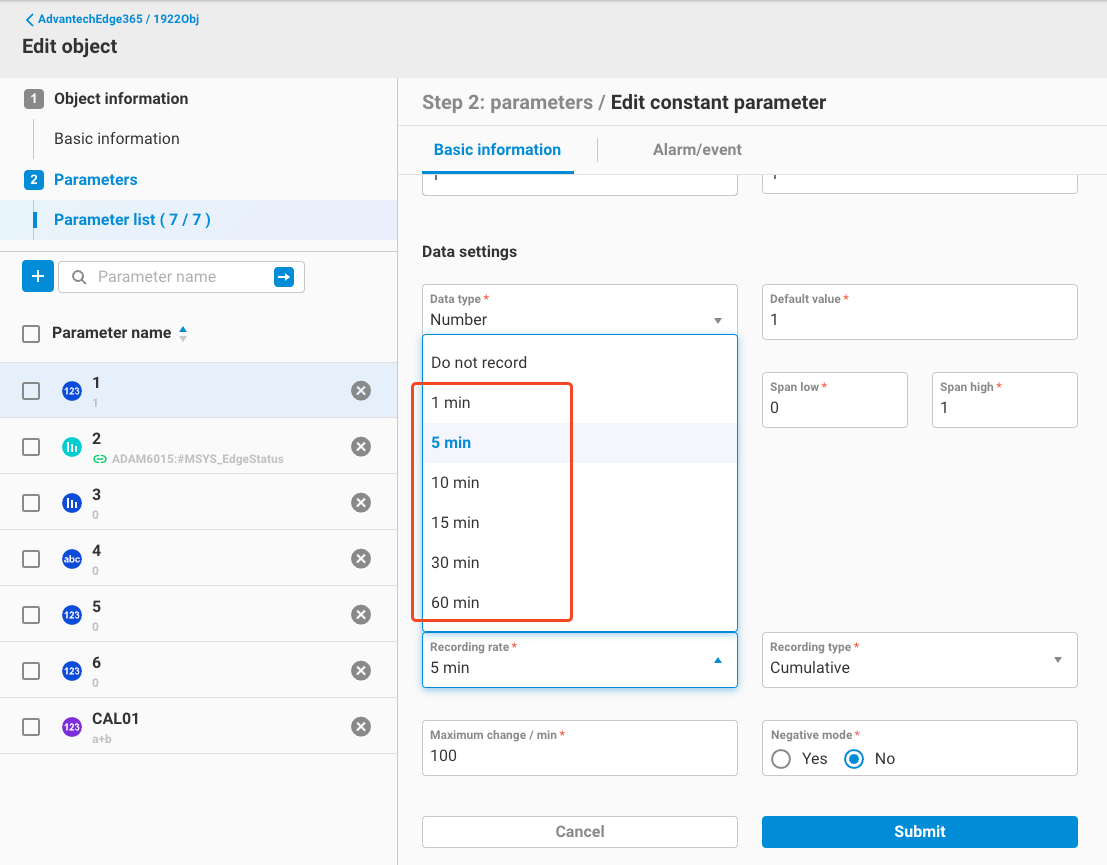
-
Data Archiving
Use the Data Archiving feature and select an option other than
Do not recordfor the Recording rate setting of the parameter to be recorded.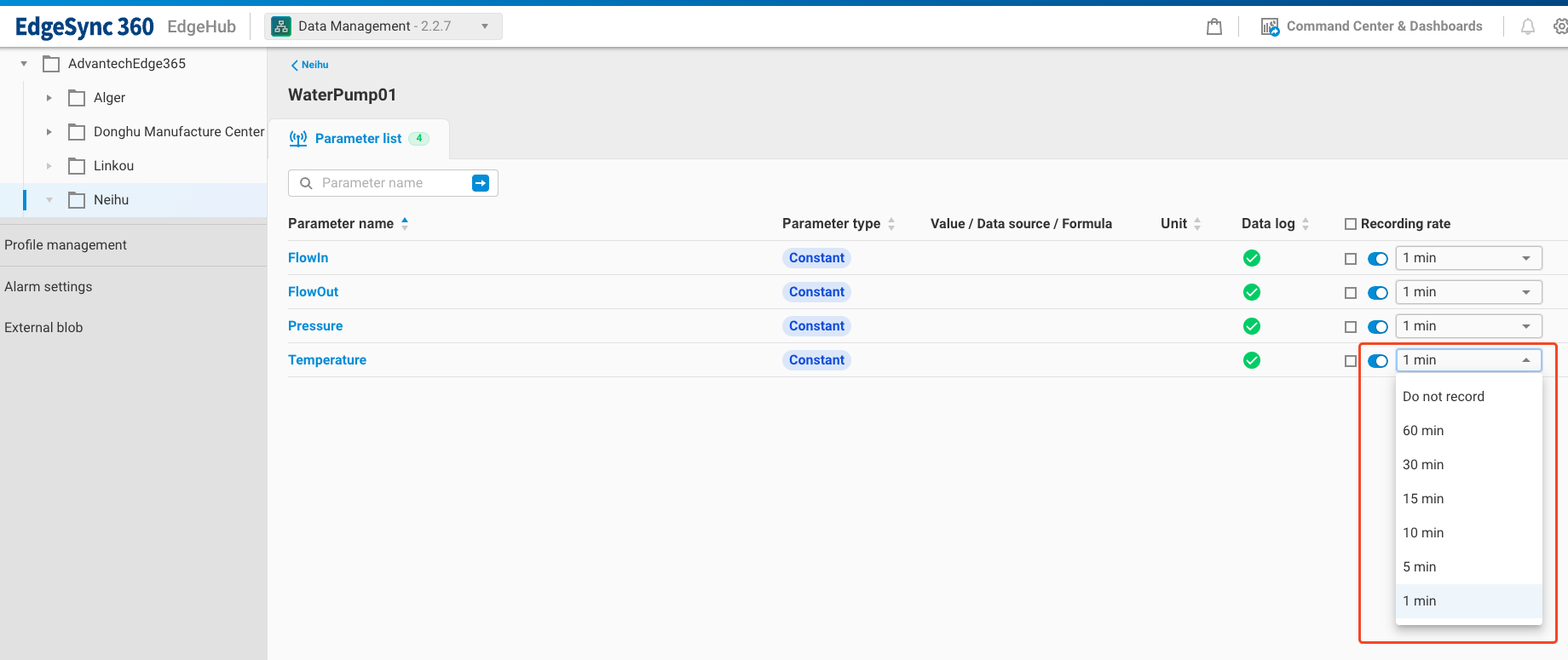
Once these settings are modified, the Archiver will calculate and save the historical data for the specified parameter according to its data type for the following time intervals:
- RAWData (raw data of the parameter)
- Recording rate (one record per set frequency)
- Hour (one record per hour)
- Day (one record per day)
The following sections will explain the calculation methods for different data types.
2. Current Type (Number - Current)
2.1 Introduction
When the data of a parameter is randomly distributed, it can be configured as a current type, such as power, voltage, current, etc.
2.2 Calculation Range
When calculating historical data of the current type, the rule for data range used for different time intervals is as follows:
- Start time ** (Maximum change per min / 60 seconds), then the value is invalid.
Example:
- Maximum change per minute:
1
If the data comes in as follows:
| Time | Value |
|---|---|
| 00:00:00 | 1 |
| 00:01:00 | 2 |
| 00:02:00 | 10 |
| 00:03:00 | 11 |
| 00:04:00 | 12 |
Then:
- The period from 00:01:00 to 00:02:00 is invalid because Abs(10 - 2) / 60 = 8/60 is greater than 1 / 60. This period's data will be marked as having bad quality.
3.5.2 Negative Mode
In the recording settings for cumulative types, there is a setting for negative mode.
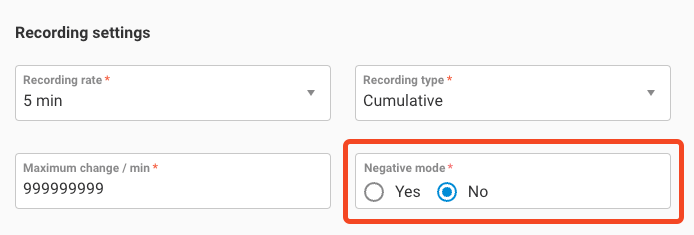
As described in section 3.1, under normal circumstances, using the cumulative type to record data means the data increases over time and does not show negative difference. Therefore, the default setting for this option is No. If negative difference occurs while this setting is applied, the difference for that period is marked as invalid.
Example:
- Negative mode = No
If the data comes in as follows:
| Time | Value |
|---|---|
| 00:00:00 | 1 |
| 00:01:00 | 2 |
| 00:02:00 | 3 |
| 00:03:00 | 2 |
| 00:04:00 | 3 |
Then:
- The period from 00:02:00 to 00:03:00 is invalid because 2 - 3 = -1 shows negative difference, which is against the rule. This period's data will be marked as having bad quality.
On the other hand, if the negative mode setting is adjusted to Yes, it means allowing negative difference data to be included in the calculations, and the data showing negative difference will not be marked as having bad quality.
Example:
- Negative mode = Yes
If the data comes in as follows:
| Time | Value |
|---|---|
| 00:00:00 | 1 |
| 00:01:00 | 2 |
| 00:02:00 | 3 |
| 00:03:00 | 2 |
| 00:04:00 | 3 |
Then:
- Although the period from 00:02:00 to 00:03:00 shows negative difference (2 - 3 = -1), since the negative mode is enabled, the difference for this period will not be marked as having bad quality.
3.6 Difference (HIS_AVG) Calculation Logic
3.6.1 Normal Conditions
As described in section 3.3, under normal conditions, the last value (Last) of the interval minus the last value of the previous interval gives the difference for that interval. This section will provide a more detailed explanation of this calculation logic.
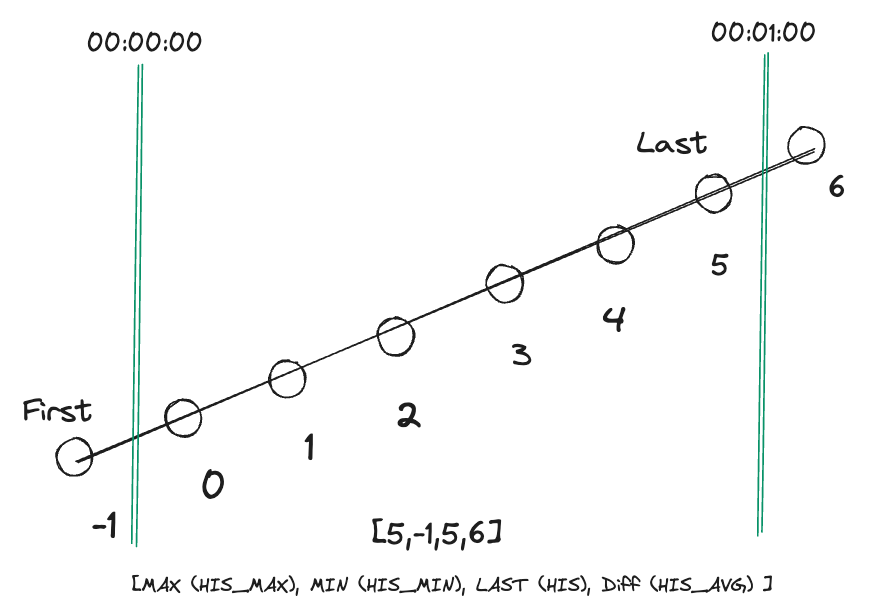
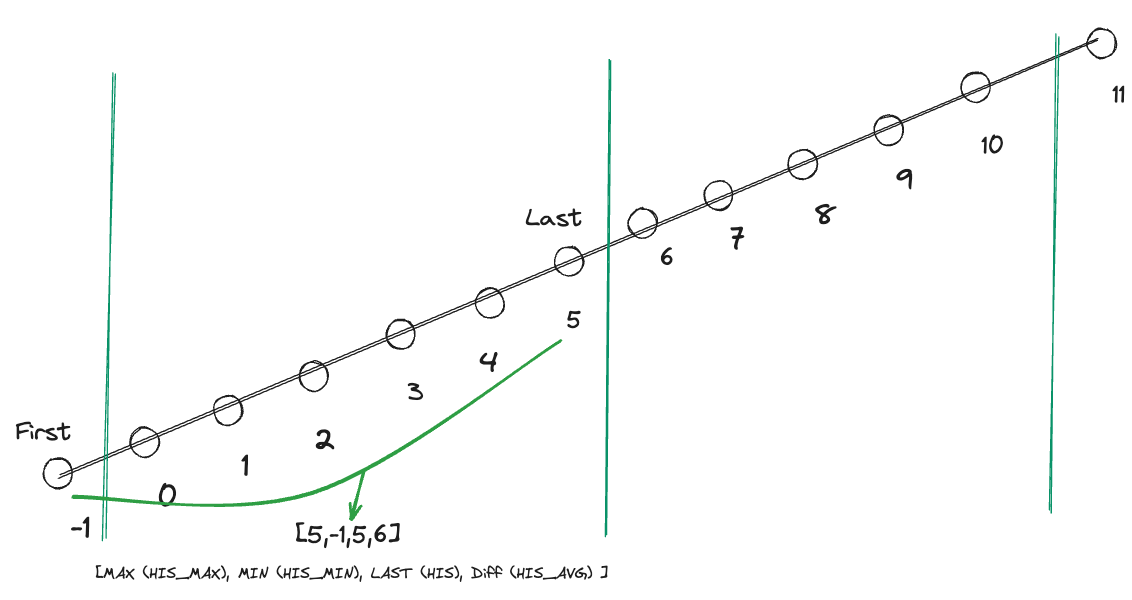
When calculating the difference for each interval, we mark the first data point (First) and the last data point (Last) within the interval. Let's take the time-shifted data example from section 3.3:
| Time | Value | Mark |
|---|---|---|
| 23:59:55 | -1 | First |
| 00:00:05 | 0 | |
| 00:00:15 | 1 | |
| 00:00:25 | 2 | |
| 00:00:35 | 3 | |
| 00:00:45 | 4 | |
| 00:00:55 | 5 | Last |
| 00:01:05 | 6 |
As previously mentioned, the value -1 at 23:59:55 extends into the interval from 00:00:00 to 00:01:00 and is therefore adopted as data. Since this is the first adopted data point, it is marked as First. The value 5 at 00:00:55 is the last adopted data point in the interval from 00:00:00 to 00:01:00 and is therefore marked as Last.
When this interval ends and moves to settlement, we calculate the difference as last data point (Last) - first data point (First). Therefore, the difference for the interval from 00:00:00 to 00:01:00 is:
5 - (-1) = 6
Thus, the result of last data point (Last) - first data point (First) in normal conditions equals the result of the last value of the interval (Last) minus the last value of the previous interval.
3.6.2 Logic for Marking First and Last
After each interval settlement, the position of First for the next interval is updated based on the following logic:
- Update First to the position of Last.
- In the scenario where negative mode is off, if Last is at the beginning of negative difference, First cannot be updated to the position of Last until the next positive difference value (including 0 difference) appears and can be marked as First.
The logic for marking Last is as follows:
- The last valid value (quality = 0) within each interval.
Here is an example of a normal calculation:
-
Using the example from 3.6.1, mark First and Last, then calculate the first interval.
-
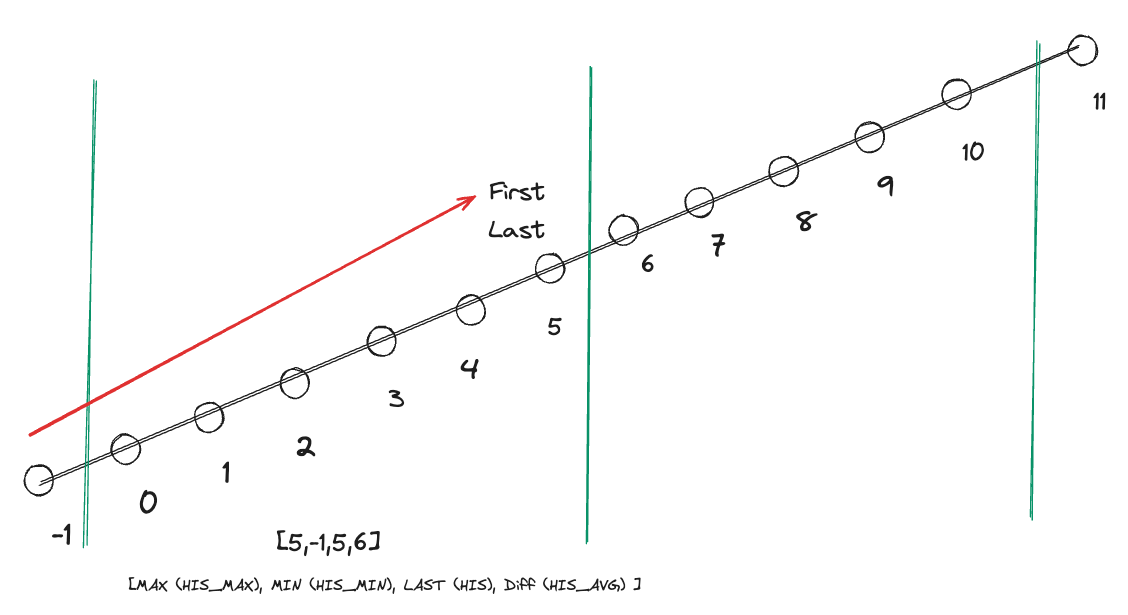
After calculation, update First to the position of Last.
-
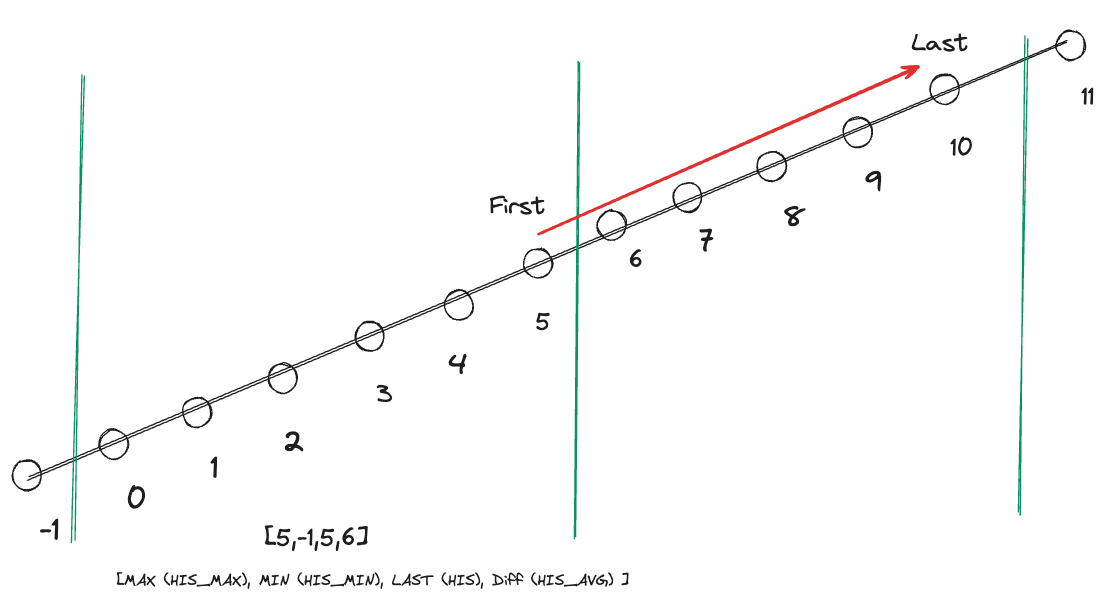
Move Last to the last valid value (quality = 0) of the next interval.
-
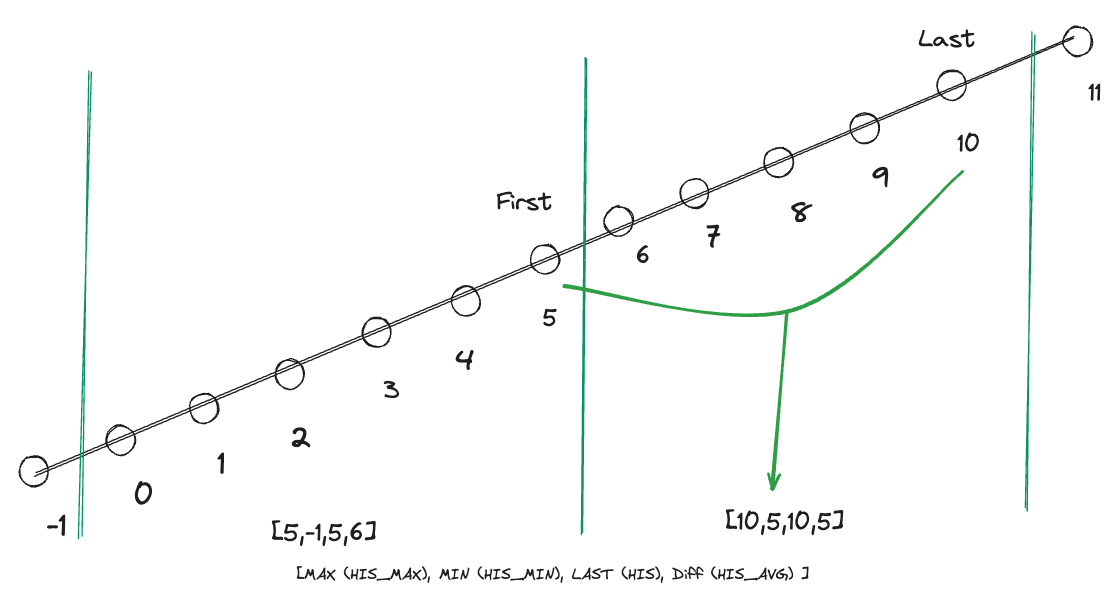
Calculate the content of the next interval.
3.6.3 Special Cases for First and Last
This section explains the special cases for marking First and Last:
- First: When negative mode is off (default), if Last happens to mark the beginning of negative difference in the data, First cannot be updated to the position of Last until the next positive difference value (including 0 difference) appears.
- Last: Within each interval, it represents the last valid value (quality = 0).
Here, we will differentiate between scenarios with negative mode turned off (default) and with negative mode turned on. Additionally, we will consider cases where the last data point may not be a valid value.
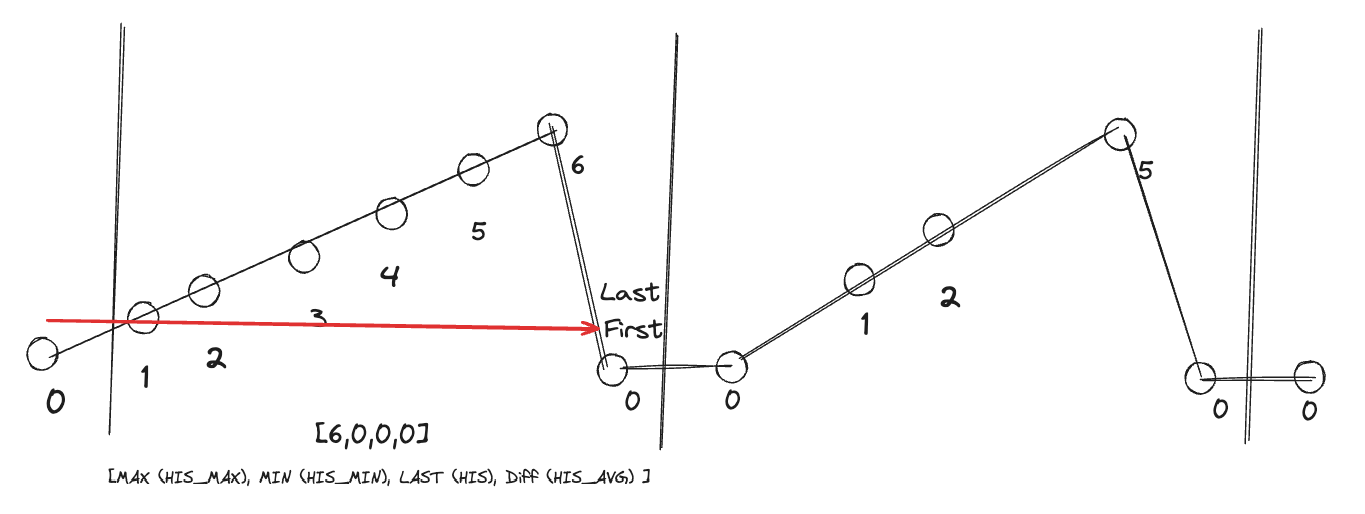
-
Negative Mode Off (Default)
-
In the first interval, mark
6as Last. The next value0is still within the interval, but since the difference from6to0is negative,0is flagged with negative difference (quality = 0x100000). Therefore, Last cannot move to position0, and since there is no next data point within the interval, Last remains at6.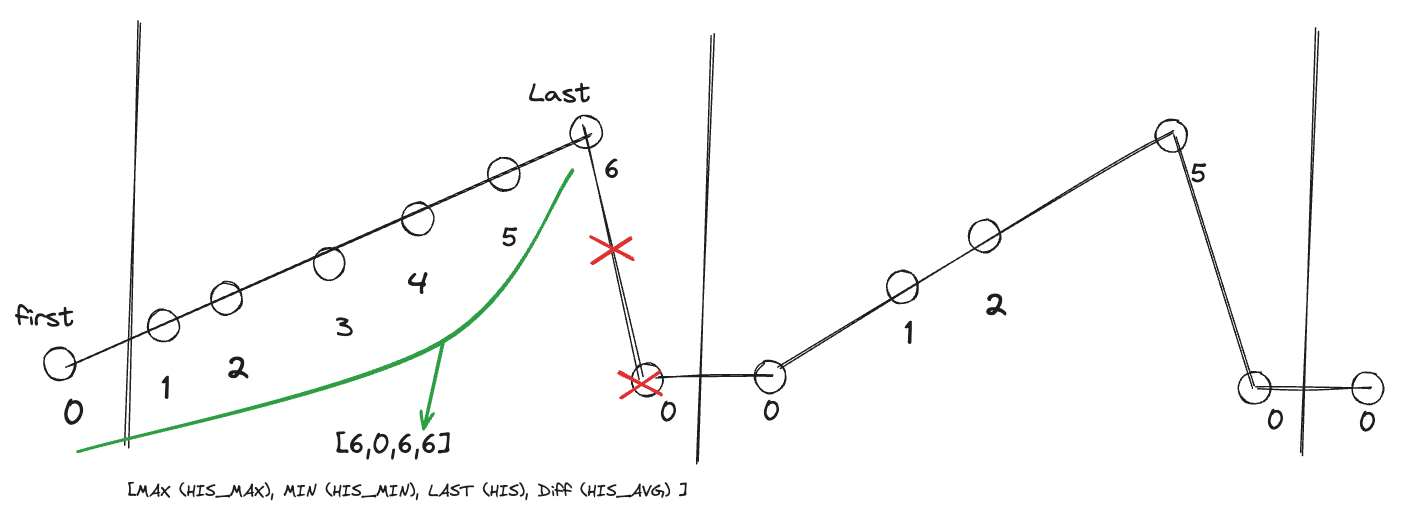
-
After calculation, when moving First, since
6is marked as Last and signifies the start of negative data difference, First needs to continue searching for the next positive difference value. Thus, the second0is chosen as the new First.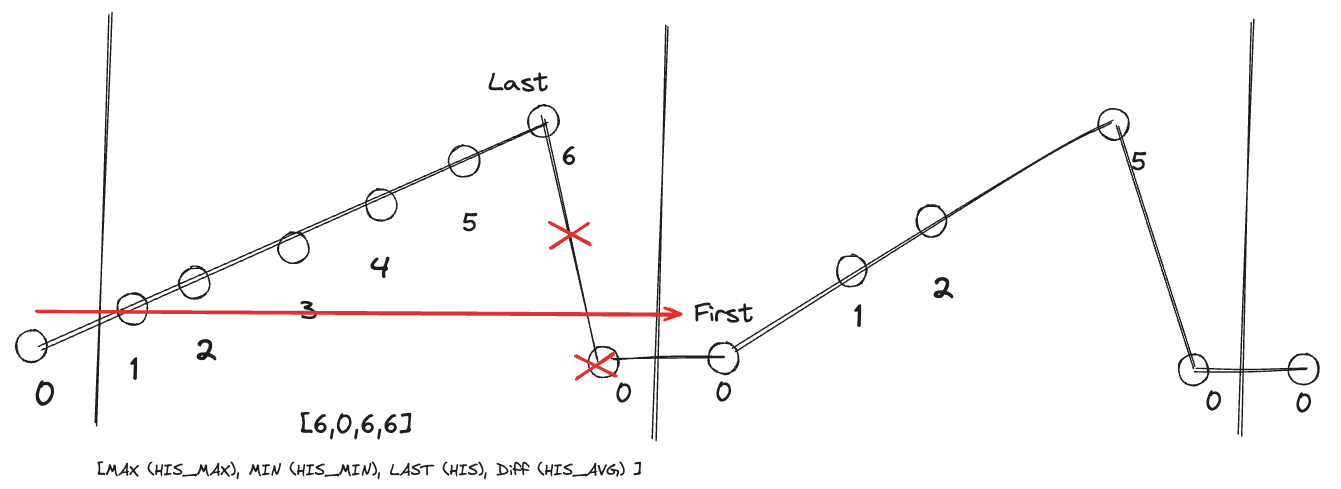
-
Moving to the next interval's Last follows the same logic: Last moves to
5, and since the difference from5to0is negative,0is flagged with negative difference (quality = 0x100000). Therefore, Last cannot move to position0, and with no next data point within the interval, Last remains at5.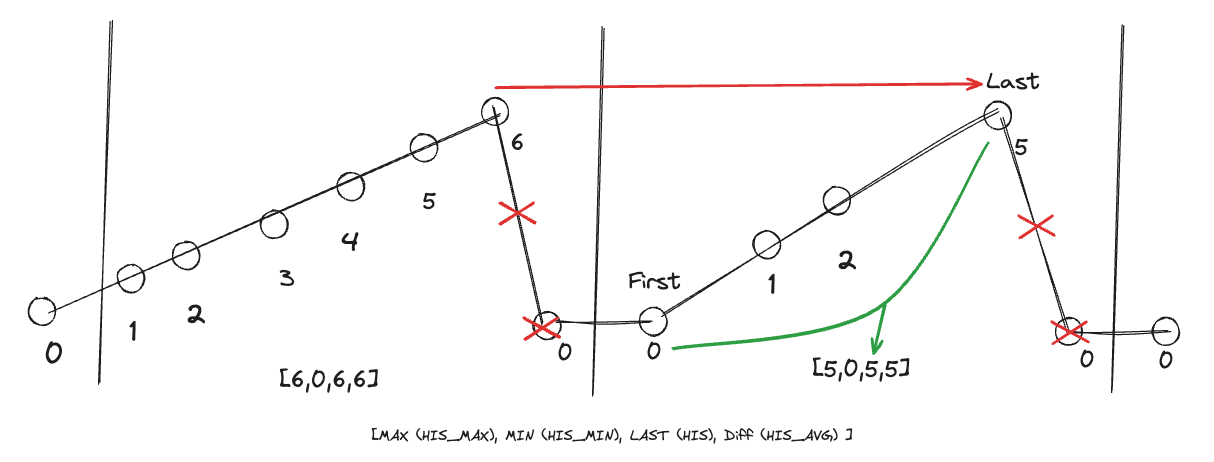
-
-
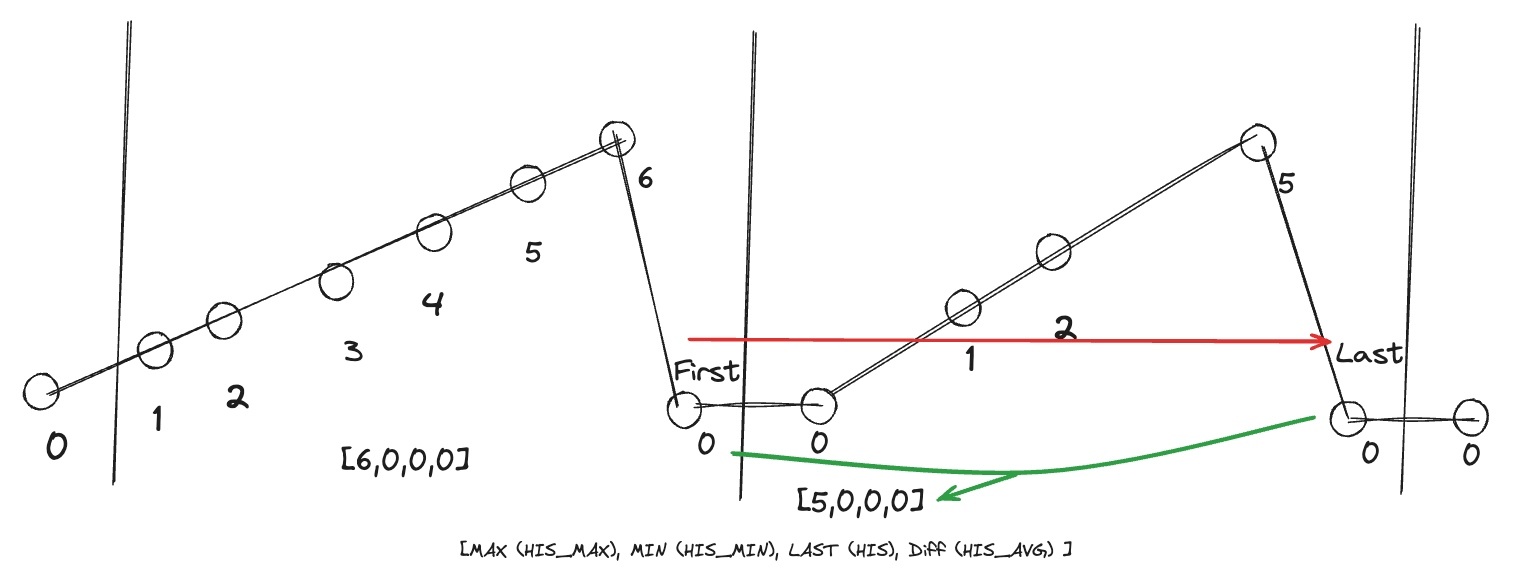
Negative Mode On
-
With negative mode enabled, the last data point of the first interval is
0, which is acceptable since negative difference is allowed.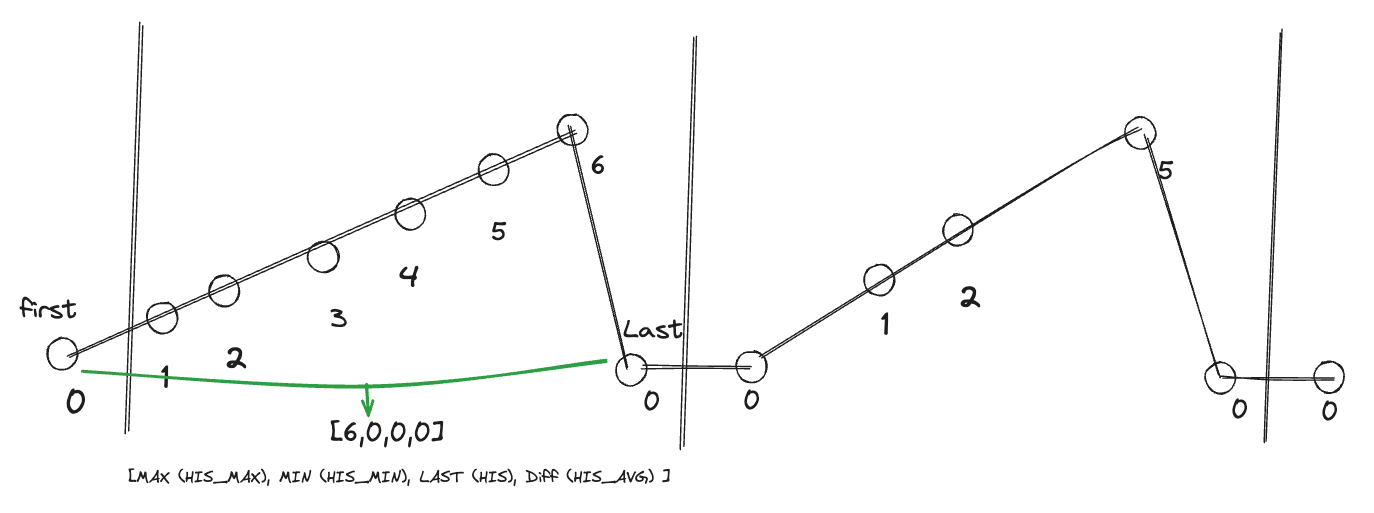
-
Moving First: Since negative mode is enabled, First moves directly to the position of Last.
-
Moving Last to the last valid value of the next interval: With negative difference allowed, the last data point of the second interval is also
0.
-
3.6.4 Recording Rate, Hour, Day: First and Last Marking
Recording Rate, Hour, and Day intervals maintain their own marking of First and Last due to their different time intervals. The examples below illustrate this:
-
Negative Mode Off (Default)
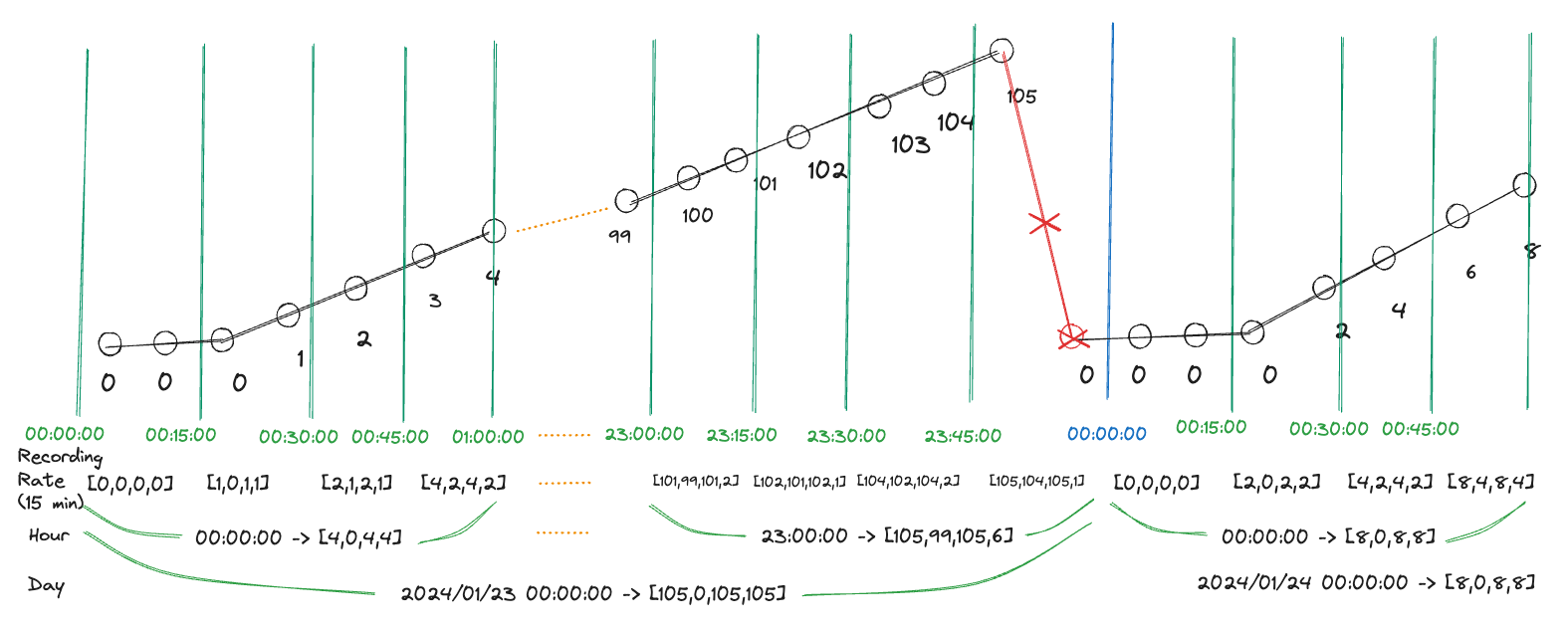
-
Negative Mode On
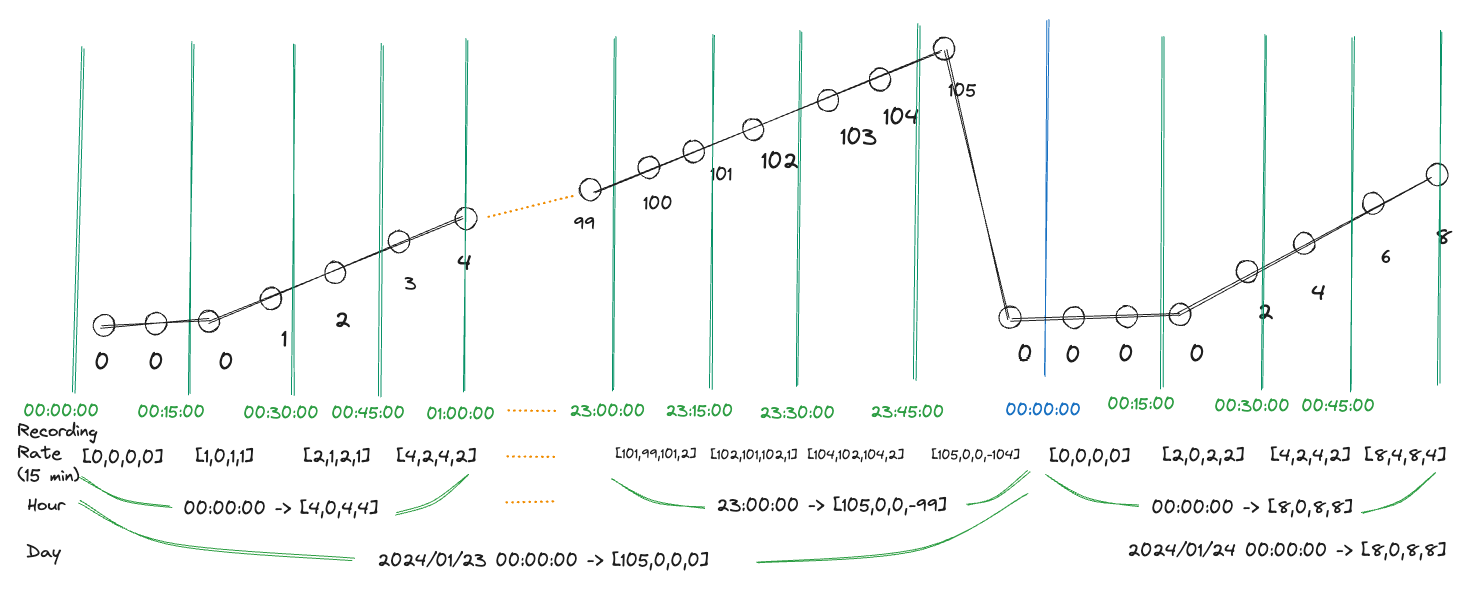
These illustrations demonstrate how First and Last are marked within different time intervals based on whether negative mode is enabled or disabled.
3.7 Special Data Calculations
Section 3.3 introduced the content calculations when the interval contains normal quality data. This section describes how data calculations are handled if there are bad quality data points within the interval.
3.7.1 Exceeding Maximum Change per Minute
If the interval contains data points that exceed the maximum change per minute (refer to section 3.5), the calculation results are as follows.
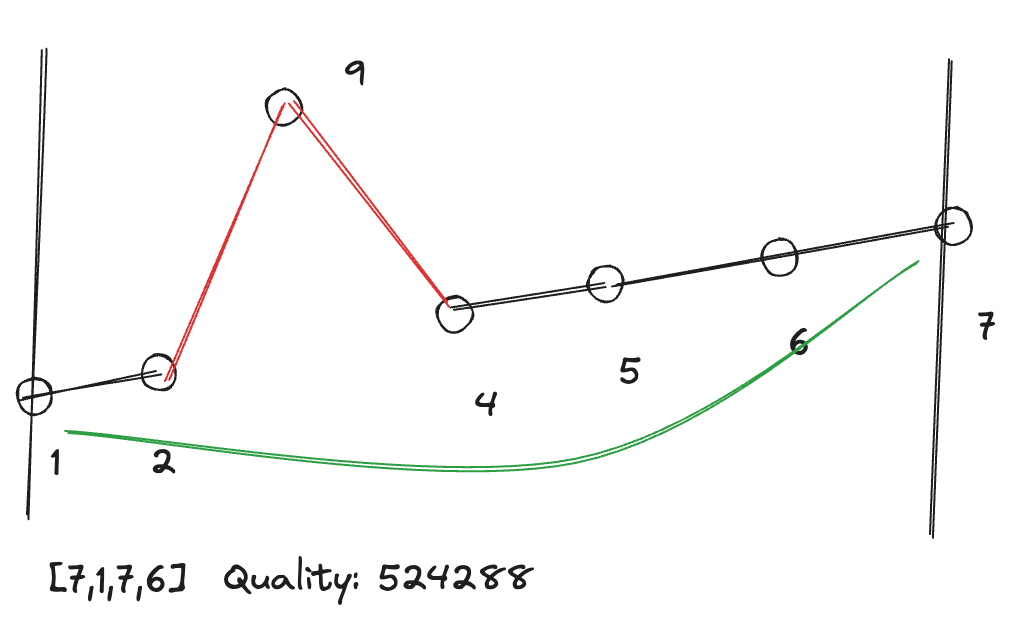
If the data comes in the following order (10 seconds per data point, recording rate = 1 minute, maximum change per minute = 6):
| Time | Value |
|---|---|
| 00:00:00 | 1 |
| 00:00:10 | 2 |
| 00:00:20 | 9 |
| 00:00:30 | 4 |
| 00:00:40 | 5 |
| 00:00:50 | 6 |
| 00:01:00 | 7 |
According to section 3.5, the intervals 00:00:10 ~ 00:00:20 and 00:00:20 ~ 00:00:30 exceed the maximum change rate. The results are:
- Max = 7
- Min = 1
- Last = 7
- Avg = 6 (7 - 1)
The quality of the interval is (0 \mid (0x80000) = 0x80000 = 524288).
3.7.2 Online and Offline
If the interval contains online or offline quality data points (refer to section 3.4), the current rule is that the time between offline and online is not included in the calculations. The results are as follows:
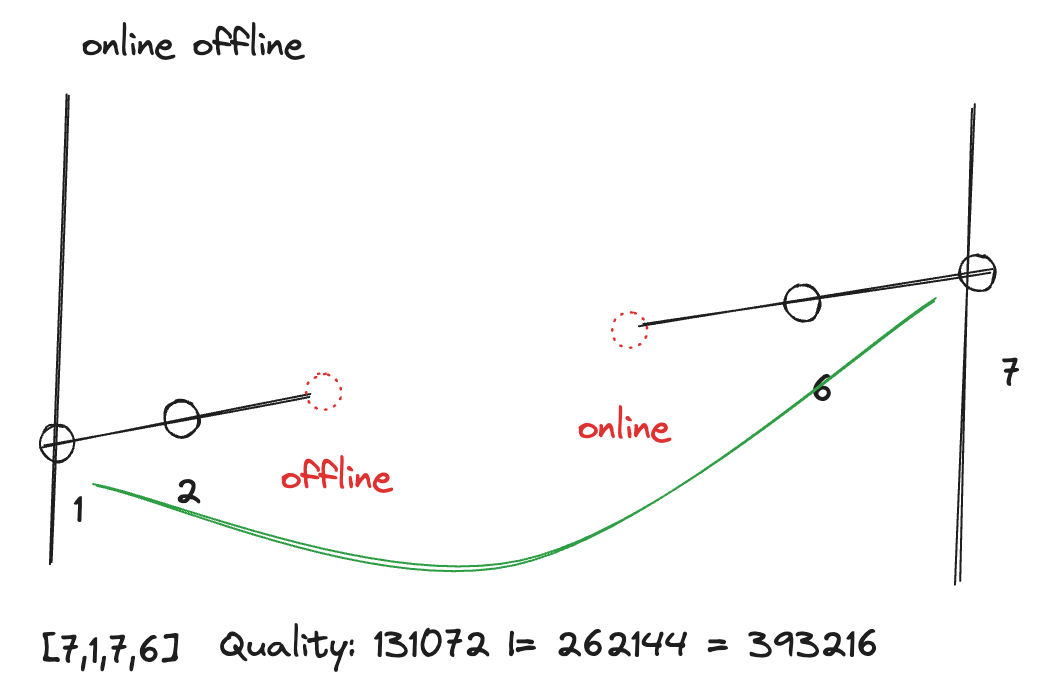
If the data comes in the following order (10 seconds per data point, recording rate = 1 minute):
| Time | Value | Quality |
|---|---|---|
| 00:00:00 | 1 | 0 |
| 00:00:10 | 2 | 0 |
| 00:00:20 | * | 0x20000 |
| 00:00:30 | * | 0x40000 |
| 00:00:40 | 5 | 0 |
| 00:00:50 | 6 | 0 |
| 00:01:00 | 7 | 0 |
The results are:
- Max = 7
- Min = 1
- Last = 7
- Avg = 6 (7 - 1)
The quality of the interval is (0 \mid (0x20000) \mid (0x40000) = 0x60000 = 393216).
3.7.3 Other Bad Quality
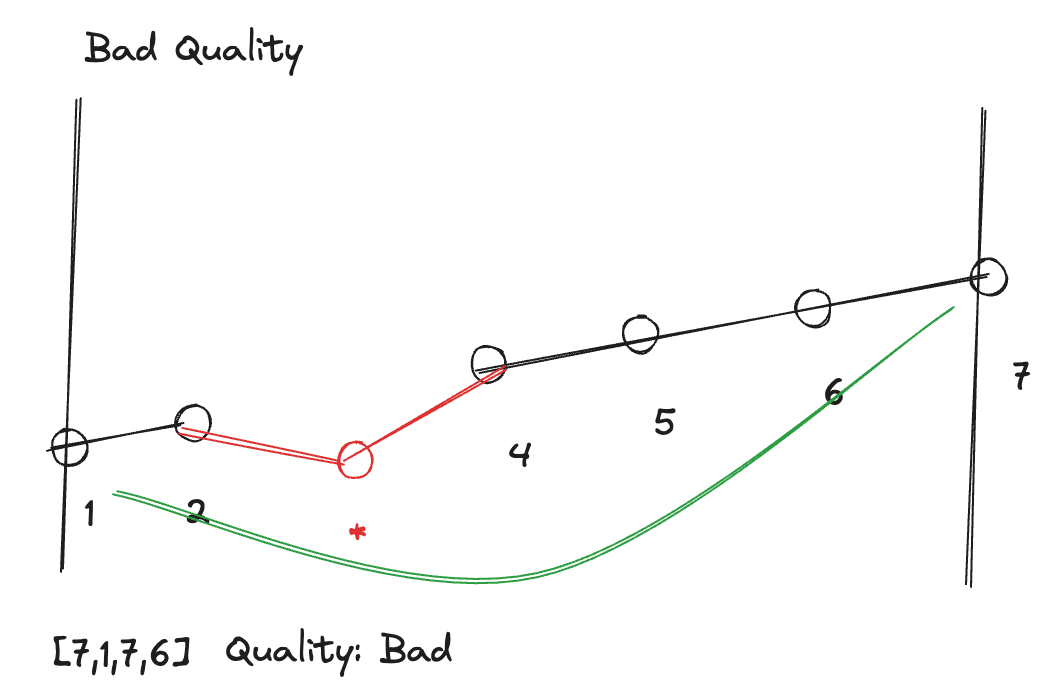
If the interval contains other bad quality data points (refer to section 3.4), the current rule is that the difference between good quality and bad quality data, as well as between bad quality and the next good quality data, is not included in the calculations. The results are as follows:
If the data comes in the following order (10 seconds per data point, recording rate = 1 minute):
| Time | Value | Quality |
|---|---|---|
| 00:00:00 | 1 | 0 |
| 00:00:10 | 2 | 0 |
| 00:00:20 | * | 0x10000 |
| 00:00:30 | 4 | 0 |
| 00:00:40 | 5 | 0 |
| 00:00:50 | 6 | 0 |
| 00:01:00 | 7 | 0 |
The results are:
- Max = 7
- Min = 1
- Last = 7
- Avg = 6 (7 - 1)
The quality of the interval is (0 \mid (0x10000) = 0x10000 = 65536).
3.7.4 Slow Upload Frequency of Raw Data Spanning Multiple Recording Rates
The following example illustrates a scenario where the time interval between two raw data points is from 23:30:00 to 01:33:10 the next day, spanning multiple recording intervals (5 minutes).
-
Negative Mode Disabled (Default)
From
23:30:00to01:33:10the data changes from 100 to 0. Since negative difference is not allowed, the minimum (Recording rate) during this period is marked as uncalculable, with a quality of negative difference (0x100000).23:30:00 ~ 23:35:00
- [100, 100, 100, 0]
- quality = 0
23:35:00 ~ 01:35:00
- [NaN, NaN, NaN, NaN]
- quality = (0x100000) = 1048576
01:35:00 ~ 01:40:00
- [10, 10, 10, 0]
- quality = (0x100000) = 1048576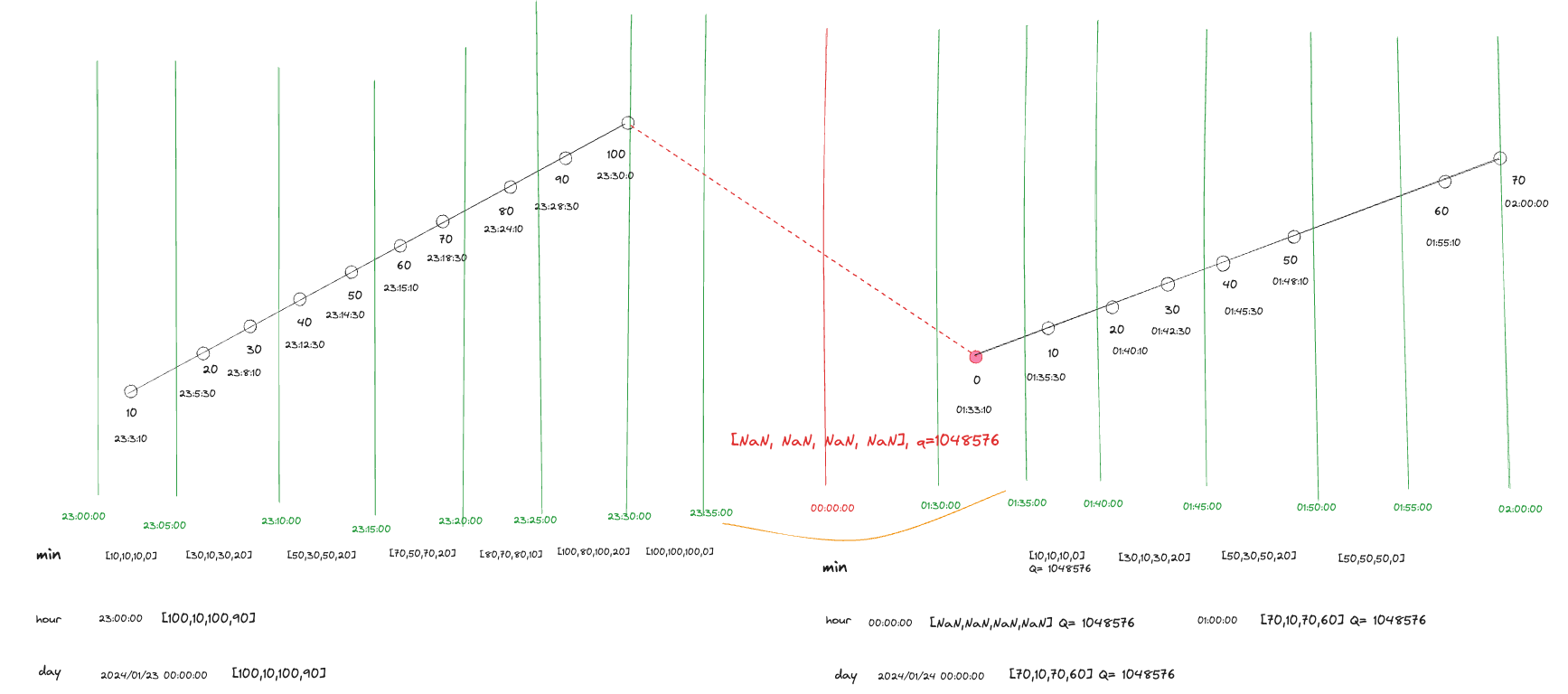
-
Negative Mode Enabled
From
23:30:00to01:33:10the next day, the data changes from 100 to 0. Since negative mode is enabled, allowing negative difference, the minimum (Recording rate) during this period is marked as the continuation of the value 100.23:30:00 ~ 01:30:00
- [100, 100, 100, 0]
- quality = 0
01:30:00 ~ 01:35:00
- [100, 0, 0, -100]
- quality = 0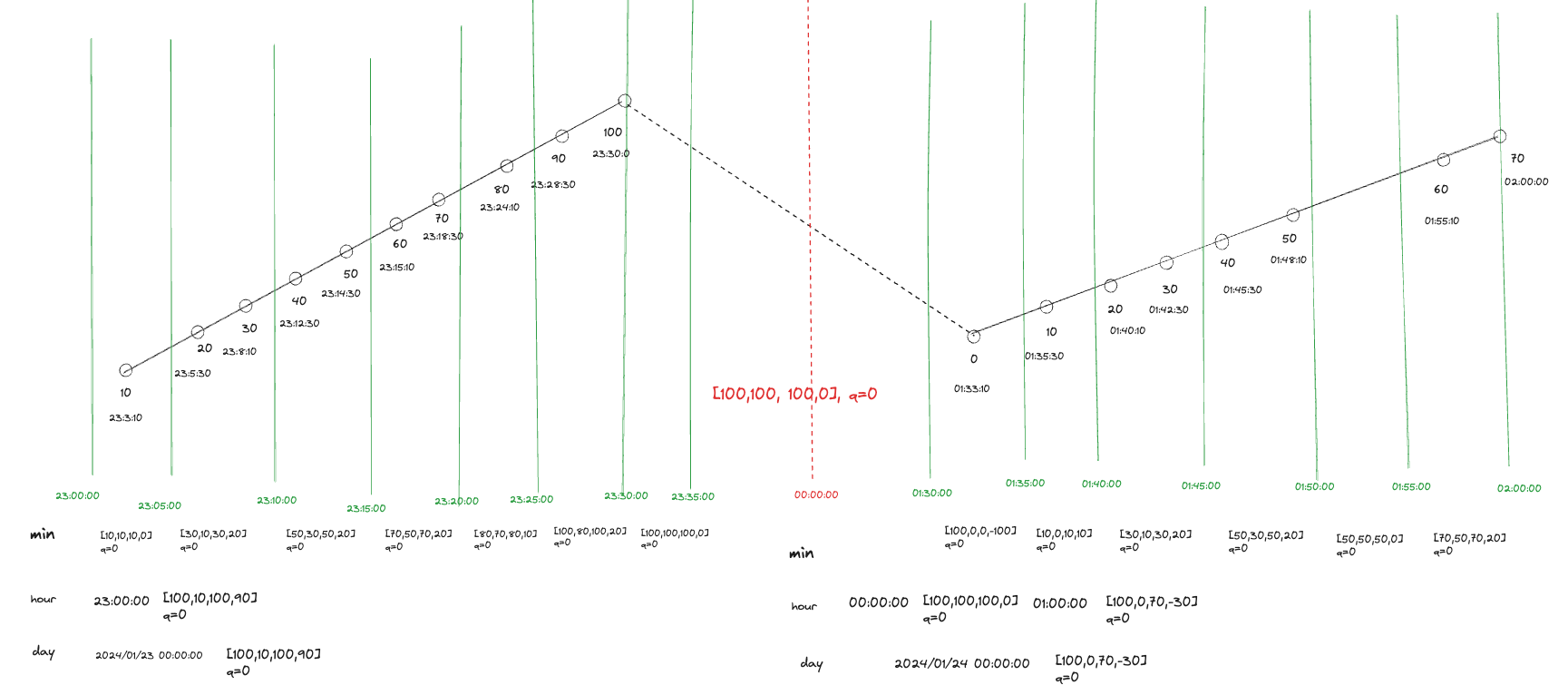
3.7.5 Invalid Values After Spanning Multiple Recording Rates
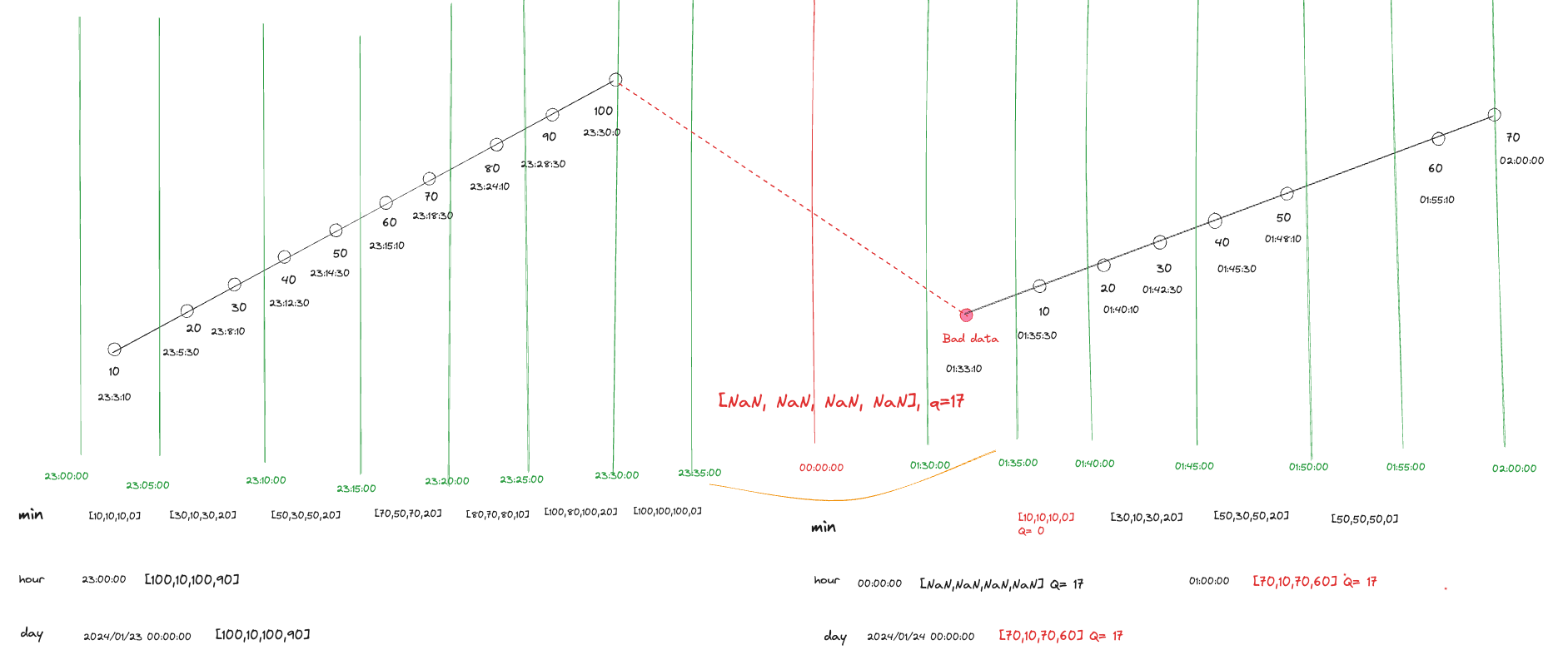
In the following example, after the device uploads data at 23:30:00 with a value of 100, the next data point at 01:33:10 the next day is abnormal. According to the calculation logic, the time between these data points is recorded as uncalculable until the first valid data point of 10 appears between 01:35:00 and 01:40:00.
23:30:00 ~ 23:35:00
- [100,100,100,0]
- quality = 0

23:35:00 ~ 01:35:00
- [NaN, NaN, NaN, NaN]
- quality = 17

01:35:00 ~ 01:40:00
- [10, 10, 10, 0]
- quality = 0
3.7.6 Online and Offline Spanning Multiple Recording Rates
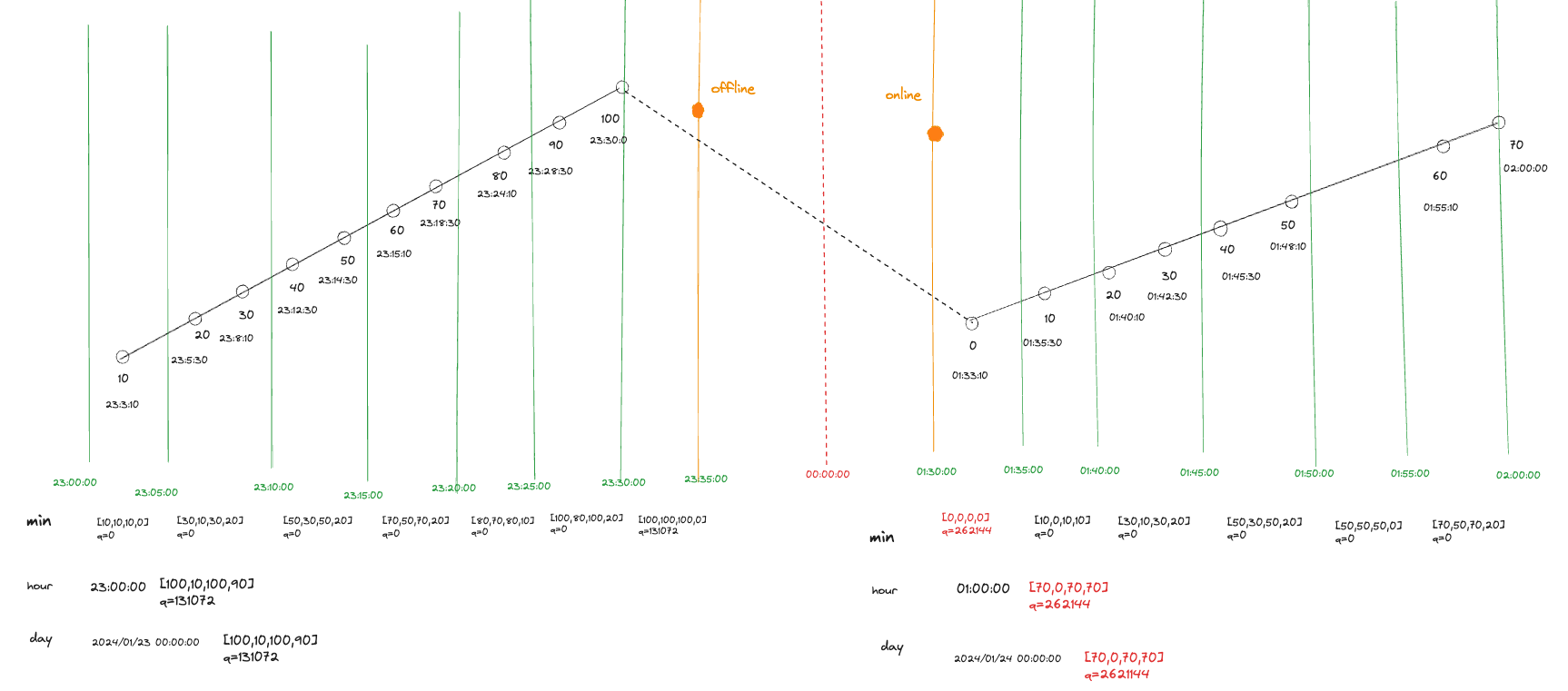
When the device goes offline and then comes online, spanning multiple recording rates, the recording rate during this time is neither calculated nor recorded. The following example shows offline occurring at 23:35:00 and online at 01:30:00 the next day.
23:30:00 ~ 23:35:00
- [100,100,100,0]
- quality = 0x20000 = 131072

23:35:00 ~ 01:30:00
- Not calculated, no record

01:30:00 ~ 01:35:00
- [0,0,0,0]
- quality = 0x40000 = 262144
4. Discrete Types
4.1 Introduction
When the data points are enumerable discrete values, the parameter can be configured as a discrete type, such as switches, connections, status codes, etc.
4.2 Calculation Range
When calculating historical data of discrete types, the data range rules for different time intervals are as follows:
- Start time <= data time < End time
Examples of various intervals are as follows:
- Recording rate = 5 min, which means recording one data point every five minutes, then the data range for 01:00:00 will be:
- 01:00:00 <= data < 01:05:00
- Hour, which means recording one data point every hour, then the data range for 01:00:00 will be:
- 01:00:00 <= data < 02:00:00
- Day, which means recording one data point every day, then the data range for January 1, 2024, will be:
- 2024/01/01T00:00:00 <= data < 2024/01/02T00:00:00
4.3 Calculation Content
When calculating historical data of discrete types, the following contents will be calculated for each time interval.
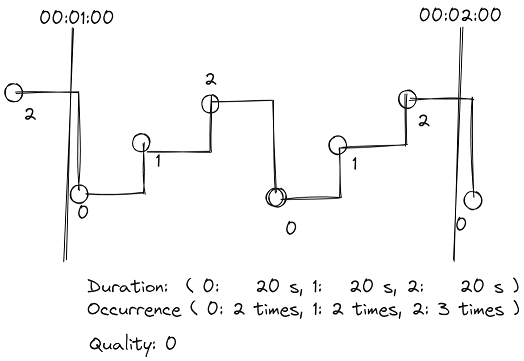
4.3.1 Cumulative Duration (CumulativeDurationS)
Calculates the duration of each status within the statistical period, in seconds.
Example: (Recording rate = 1 min, the original data within the interval is as follows)
| Time | Value |
|---|---|
| 00:00:51 | 2 |
| 00:01:01 | 0 |
| 00:01:11 | 1 |
| 00:01:21 | 2 |
| 00:01:31 | 0 |
| 00:01:41 | 1 |
| 00:01:51 | 2 |
| 00:02:01 | 0 |
For the interval 00:01:00 ~ 00:02:00, the cumulative duration is: status 0 lasts for 20 seconds, status 1 lasts for 20 seconds, and status 2 lasts for 20 seconds.
4.3.2 Occurrence Number (OccurrenceNumber)
Counts the number of occurrences of each status within the statistical period.
Example: (Recording rate = 1 min, the original data within the interval is as follows)
| Time | Value |
|---|---|
| 00:00:51 | 2 |
| 00:01:01 | 0 |
| 00:01:11 | 1 |
| 00:01:21 | 2 |
| 00:01:31 | 0 |
| 00:01:41 | 1 |
| 00:01:51 | 2 |
| 00:02:01 | 0 |
For the interval 00:01:00 ~ 00:02:00, the occurrence number is: status 0 occurs 2 times, status 1 occurs 2 times, and status 2 occurs 3 times.
4.3.3 First Status and Status Continuity (FirstStatus)
Determines whether the first status of the current period is continuous with the previous period, and if so, records the first status value.
Example: (Recording rate = 1 min, the original data within the interval is as follows)
| Time | Value |
|---|---|
| 00:00:51 | 2 |
| 00:01:01 | 0 |
| 00:01:11 | 1 |
| 00:01:21 | 2 |
| 00:01:31 | 0 |
| 00:01:41 | 1 |
| 00:01:51 | 2 |
| 00:02:00 | 0 |
| 00:02:10 | 1 |
For the interval 00:01:00 ~ 00:02:00, the status continuity is true, and the first status is 2. For the interval 00:02:00 ~ 00:03:00, the status continuity is false, and the first status value is not recorded.
4.4 Data Quality
Data Quality (Quality) indicates whether the data is normal.
Normal data has a Quality value of 0 (Good quality);
Abnormal data has a Quality value set to a non-zero value (Bad quality) indicating the corresponding meaning.
If there are multiple Bad quality occurrences within an interval, they will be bitwise OR'd together to form a new Quality value.
- Normal data (0)
- Non-numeric (17): Data value is NaN
- Data value=
*(0x10000) - Device offline (0x20000)
- Device online (0x40000)
- Invalid value (0x80000): EdgeHub Archiver determines the data is invalid based on user-configured range.
- Other values: Original data carries its own Quality.
4.5 Determining Invalid Values
4.5.1 Unsupported Status Values
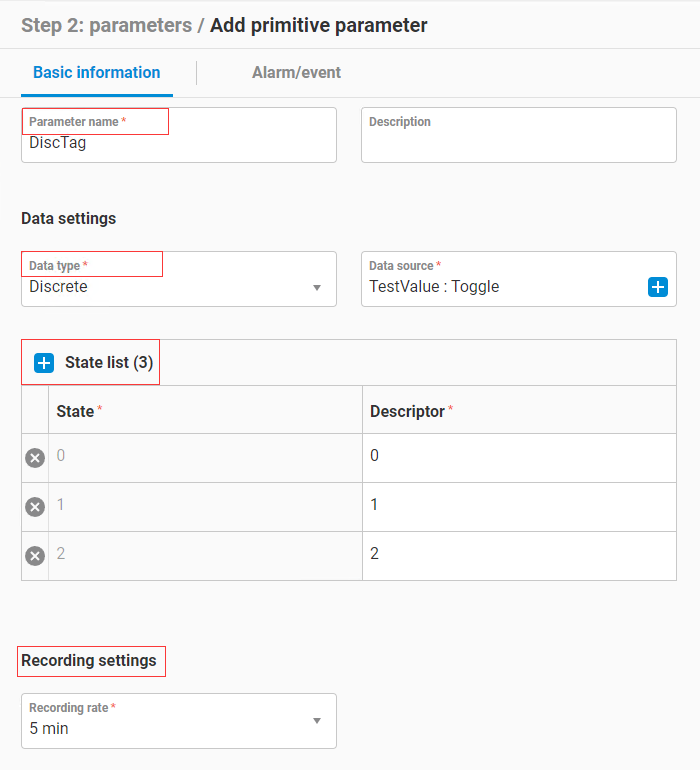
In the discrete parameter type record settings, there is a Status list configuration.

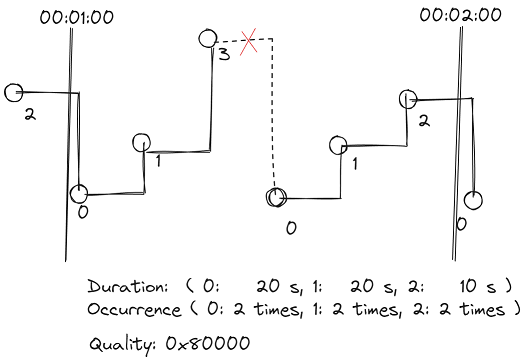
As shown, the configured status list includes 0, 1, and 2. If a status value outside of 0, 1, and 2 is received, that status is considered invalid and its duration and occurrence count will not be recorded.
In this case, the data quality of the statistical data for this recording interval will be set to Invalid value (0x80000).
4.5.2 Data with Non-zero Quality
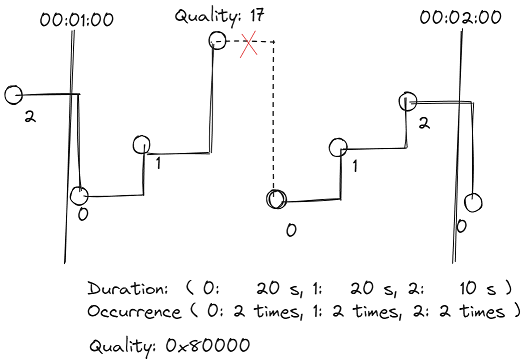
When data with non-zero Quality is received, the status of that data is considered invalid and its duration and occurrence count will not be recorded.
In this case, the data quality of the statistical data for this recording interval will be set to the received data's Quality value.
4.6 Special Data Calculations
Special data calculations when invalid values are encountered.
4.6.1 Unsupported Status Values
Example: (Recording rate = 1 min, raw data within the interval as below)
| Time | Value |
|---|---|
| 00:00:51 | 2 |
| 00:01:01 | 0 |
| 00:01:11 | 1 |
| 00:01:21 | 3 |
| 00:01:31 | 0 |
| 00:01:41 | 1 |
| 00:01:51 | 2 |
| 00:02:01 | 0 |
For the interval 00:01:00 ~ 00:02:00:
Duration: Status 0 lasted 20 seconds, status 1 lasted 20 seconds, status 2 lasted 10 seconds.
Occurrence: Status 0 appeared 2 times, status 1 appeared 2 times, status 2 appeared 2 times.
Quality: 0x80000
4.6.2 Data with Non-zero Quality
Example: (Recording rate = 1 min, raw data within the interval as below)
| Time | Value | Quality |
|---|---|---|
| 00:00:51 | 2 | 0 |
| 00:01:01 | 0 | 0 |
| 00:01:11 | 1 | 0 |
| 00:01:21 | nil | 17 |
| 00:01:31 | 0 | 0 |
| 00:01:41 | 1 | 0 |
| 00:01:51 | 2 | 0 |
| 00:02:01 | 0 | 0 |
For the interval 00:01:00 ~ 00:02:00:
Duration: Status 0 lasted 20 seconds, status 1 lasted 20 seconds, status 2 lasted 10 seconds.
Occurrence: Status 0 appeared 2 times, status 1 appeared 2 times, status 2 appeared 2 times.
Quality: 17
4.6.3 Device Online/Offline
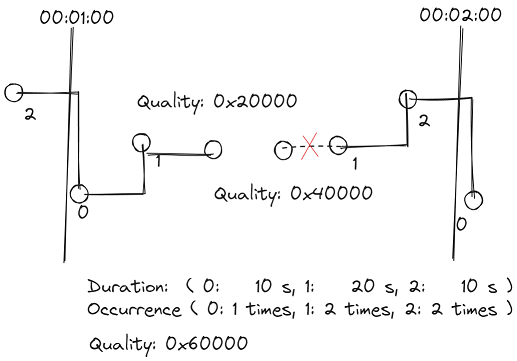
Example: (Recording rate = 1 min, raw data within the interval as below)
| Time | Value | Quality |
|---|---|---|
| 00:00:51 | 2 | 0 |
| 00:01:01 | 0 | 0 |
| 00:01:11 | 1 | 0 |
| 00:01:21 | nil | 0x20000 |
| 00:01:31 | nil | 0x40000 |
| 00:01:41 | 1 | 0 |
| 00:01:51 | 2 | 0 |
| 00:02:01 | 0 | 0 |
For the interval 00:01:00 ~ 00:02:00:
Duration: Status 0 lasted 20 seconds, status 1 lasted 20 seconds, status 2 lasted 10 seconds.
Occurrence: Status 0 appeared 2 times, status 1 appeared 2 times, status 2 appeared 2 times.
Quality: 0x60000
5. Text Type
5.1 Introduction
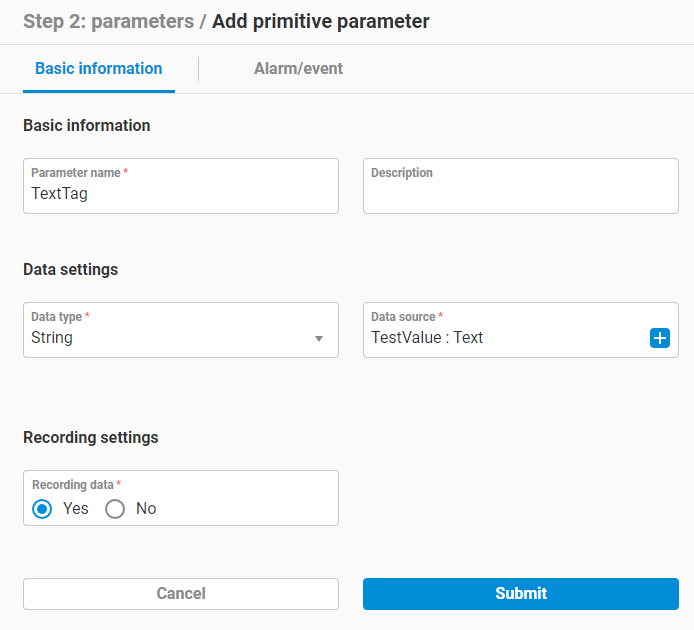
When the parameter data is a text string, you can configure the parameter as a text type, such as device name, device model, etc.
5.2 Calculation Range
Text type parameters do not have a fixed recording time; historical data is recorded each time data for that parameter is received.