What is GPU pass-through
GPU pass-through technology allows containerized applications to directly access the GPU hardware resources of the host system. This provides containers with bare-metal performance for GPU-intensive workloads, making it ideal for AI/ML applications that require significant computational power. By enabling direct GPU access, applications can utilize GPU cores for parallel processing, significantly accelerating training and inference tasks compared to CPU-only environments.
Advantech Container Catalog
Advantech provides an GPU Passthrough with built-in support for GPUs and frameworks like PyTorch, TensorFlow, and CUDA®. This section explains how to leverage GPU pass-through capabilities for AI applications using this container image.
Demo Scenario
A data center administrator needs to proactively monitor server temperatures to prevent system crashes and hardware failures. Using Advantech's GPU-accelerated container, they can deploy a real-time temperature monitoring system that uses deep learning to predict potential system failures before they occur. This approach leverages historical temperature data and LSTM (Long Short-Term Memory) neural networks to detect anomalous temperature patterns that precede system crashes.
Before you start
To follow this tutorial effectively, familiarity with the following technologies and concepts will be helpful:
- Docker and container orchestration: Understanding of containers, images, GPU pass-through, and Docker Compose
- Python programming: Knowledge of Python, PyTorch, and deep learning concepts
- GPU computing: Basic familiarity with CUDA® and GPU acceleration principles
- System monitoring: Understanding of hardware monitoring and temperature thresholds
If you need to strengthen your knowledge in these areas, here are some helpful resources.
Run the container
-
Visit the GPU Passthrough website to review container details, GPU compatibility, and system requirements.
-
Ensure your system has compatible GPUs with appropriate drivers installed, as the container requires GPU pass-through capabilities.
-
Download the required Docker Compose file and build script from GitHub
-
Place both files (
build.shanddocker-compose.yml) in the same directory on your device. -
Run the build script with the following commands:
chmod +x build.sh
sudo ./build.sh -
After running build.sh, you will enter the container with a bash UI
Build and run your own application
Understanding the demo components
This demo consists of several key components:
-
Training Dataset: The
fake_temp.csvfile contains historical temperature data paired with binary labels indicating whether a system crash occurred. This dataset is used to train our predictive model. -
LSTM Neural Network Model: The
train.pyscript defines and trains a deep learning model using PyTorch's LSTM cells, which are particularly suited for sequence data like temperature patterns over time. -
Real-time Monitoring System: The
ai.pyscript implements a monitoring system that continuously collects temperature data and uses the trained model to predict potential system failures.
Start Coding and build image
-
On your device, create a new folder
mkdir myContainer
cd myContainer -
Create/Copy below files uder myContainer
fake_temp.csvtrain.pyai.pyrunfake.pyto make the mock data to training.
-
Create/Copy your docker file under myContainer folder
-
Build your own container
docker build -t myapp:V1.0.0 . -
Create/Copy your docker Compose under myContainer folder
-
Testing the application, make sure you are in the myContainer directory
docker compose up -d
docker exec -it myapp bash -
In the container training the model.
cd /app/Demo
python3 train.py

## Expect Result:
## Run on: GPU mode
## Epoch 1, Loss: 0.0206
## Epoch 2, Loss: 0.0089
## Model training completed and saved. -
Run the monitoring system.
python3 ai.py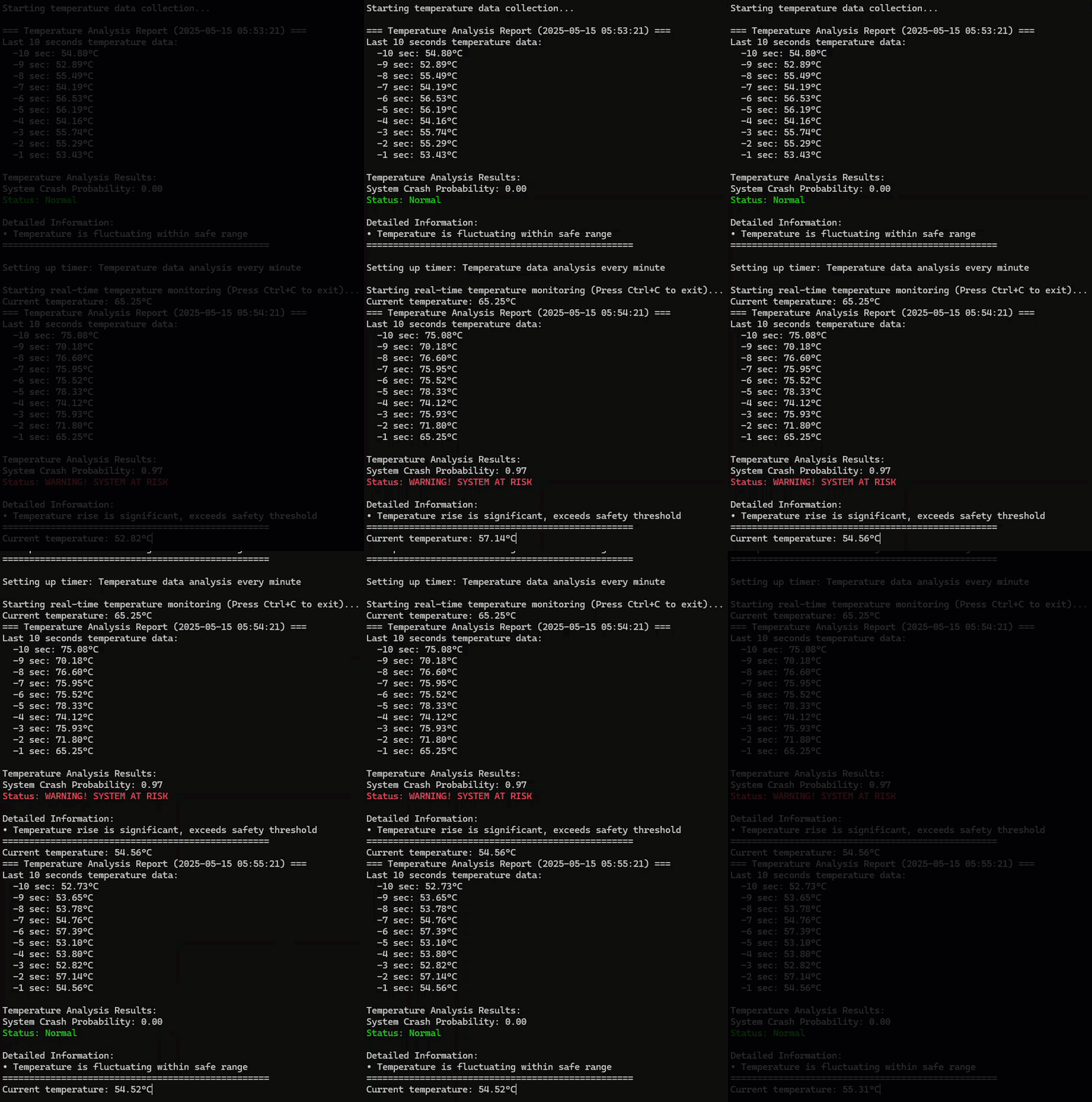
Summary of the Demo
This demo serves as a simple proof-of-concept to demonstrate how you can:
- Utilize GPU Resources: Verify that our container effectively accesses and utilizes GPU hardware resources
- Train Models on GPU: Show that AI models can be trained using GPU acceleration within the container
- Perform Inference: Confirm that predictive functionality can run efficiently with GPU support
The temperature monitoring scenario is a straightforward example chosen to illustrate these capabilities, not to represent a production-ready monitoring system.
Source Code
fake_temp.csv
timestamp,temperature,crash
0,56.80147341051153,0
1,55.412888672380454,0
2,56.66728750403718,0
3,57.69486812141695,0
4,54.240586445734856,0
5,54.1672623382035,0
6,54.42810667906887,0
7,54.24414035461038,0
8,52.38623279590845,0
...more
train.py
import torch
import torch.nn as nn
import pandas as pd
import numpy as np
from torch.utils.data import Dataset, DataLoader

class TemperatureDataset(Dataset):
    def __init__(self, csv_path, window_size=60):
        df = pd.read_csv(csv_path)
        temps = df['temperature'].values
        labels = df['crash'].values
        self.samples = []
        self.targets = []
        for i in range(len(temps) - window_size):
            self.samples.append(temps[i:i+window_size])
            self.targets.append(labels[i+window_size-1])
        self.samples = np.array(self.samples, dtype=np.float32)
        self.targets = np.array(self.targets, dtype=np.float32)

    def __len__(self):
        return len(self.samples)

    def __getitem__(self, idx):
        return self.samples[idx], self.targets[idx]

class LSTMClassifier(nn.Module):
    def __init__(self, input_size=1, hidden_size=32, num_layers=1):
        super().__init__()
        self.lstm = nn.LSTM(input_size, hidden_size, num_layers, batch_first=True)
        self.fc = nn.Linear(hidden_size, 1)
        self.sigmoid = nn.Sigmoid()

    def forward(self, x):
        x = x.unsqueeze(-1)  # (batch, seq_len, 1)
        out, _ = self.lstm(x)
        out = out[:, -1, :]
        out = self.fc(out)
        out = self.sigmoid(out)
        return out.squeeze()

# Dataset and Model
dataset = TemperatureDataset('fake_temp.csv', window_size=60)
dataloader = DataLoader(dataset, batch_size=128, shuffle=True)
device = torch.device("cuda" if torch.cuda.is_available() else "cpu")
print(f"Run on: {'GPU' if device.type == 'cuda' else 'CPU'} mode")
model = LSTMClassifier().to(device)
criterion = nn.BCELoss()
optimizer = torch.optim.Adam(model.parameters(), lr=1e-3)

# Training
for epoch in range(2):
    model.train()
    total_loss = 0
    for batch_x, batch_y in dataloader:
        batch_x = batch_x.to(device)
        batch_y = batch_y.to(device)
        optimizer.zero_grad()
        outputs = model(batch_x)
        loss = criterion(outputs, batch_y)
        loss.backward()
        optimizer.step()
        total_loss += loss.item()
    print(f"Epoch {epoch+1}, Loss: {total_loss/len(dataloader):.4f}")

torch.save(model.state_dict(), "lstm_temp_model.pth")
print("Model training completed and saved.")
ai.py
import collections
import time
import torch
import numpy as np
import datetime
import threading
from train import LSTMClassifier

device = torch.device("cuda" if torch.cuda.is_available() else "cpu")

# Print whether using GPU or CPU
print(f"Using device: {device} ({'GPU' if device.type == 'cuda' else 'CPU'})")

# Reload model
model = LSTMClassifier().to(device)
model.load_state_dict(torch.load("lstm_temp_model.pth"))
model.eval()

def predict_crash(model, temp_history):
    with torch.no_grad():
        x = torch.tensor(np.array(temp_history, dtype=np.float32)).unsqueeze(0).to(device)
        prob = model(x).item()
        return prob, prob > 0.5

def generate_past_minute_temp_data():
    """Generate temperature data for the past minute with second-level precision"""
    temp_history = collections.deque(maxlen=60)
    for i in range(40):
        temp = 55 + np.random.randn() * 1.5
        temp_history.append(temp)
    for i in range(10):
        temp = 57 + np.random.randn() * 1.5
        temp_history.append(temp)
    for i in range(10):
        temp = 65 + np.random.randn() * 2.0
        temp_history.append(temp)

    return temp_history

temp_collector = collections.deque(maxlen=60)

def simulate_temp_reading():
    """Function to simulate temperature readings based on a 5-minute cycle pattern
    Minutes 1 and 4 will show normal temperatures, while minutes 2, 3, and 5 will
    show abnormal temperatures.
    """
    current_minute = datetime.datetime.now().minute % 5

    if current_minute == 0 or current_minute == 3:
        return 55 + np.random.randn() * 1.5
    else:
        return 75 + np.random.randn() * 5.0

def analyze_temperature_data():
    """Analyze temperature data from the past minute"""
    global temp_collector

    if len(temp_collector) < 60:
        print(f"Collecting data... Currently collected {len(temp_collector)} data points, need 60")
        return

    now = datetime.datetime.now()
    print(f"\n=== Temperature Analysis Report ({now.strftime('%Y-%m-%d %H:%M:%S')}) ===")
    temp_list = list(temp_collector)
    print(f"Last 10 seconds temperature data:")
    for i in range(-10, 0):
        print(f"  -{abs(i)} sec: {temp_list[i]:.2f}°C")

    prob, is_crash = predict_crash(model, temp_collector)
    print("\nTemperature Analysis Results:")
    print(f"System Crash Probability: {prob:.2f}")

    if is_crash:
        print(f"\033[91mStatus: WARNING! SYSTEM AT RISK\033[0m")
    else:
        print(f"\033[92mStatus: Normal\033[0m")

    if is_crash:
        print("\nDetailed Information:")
        print("• Temperature rise is significant, exceeds safety threshold")
    else:
        print("\nDetailed Information:")
        print("• Temperature is fluctuating within safe range")
    print("="*50)

def scheduler():
    """Timer function, performs temperature analysis once per minute"""
    analyze_temperature_data()
    timer = threading.Timer(60.0, scheduler)
    timer.daemon = True
    timer.start()

def main():
    """Main function, starts the temperature monitoring system"""
    print("Temperature Monitoring System Starting...")
    print(f"Run on {'GPU' if device.type == 'cuda' else 'CPU'} mode")
    print("Starting temperature data collection...")
    for i in range(60):
        temp = simulate_temp_reading()
        temp_collector.append(temp)

    analyze_temperature_data()

    print("\nSetting up timer: Temperature data analysis every minute")
    timer = threading.Timer(60.0, scheduler)
    timer.daemon = True
    timer.start()

    # Main loop: continuously collect temperature data
    try:
        print("\nStarting real-time temperature monitoring (Press Ctrl+C to exit)...")
        while True:
            # Simulate temperature reading
            temp = simulate_temp_reading()
            temp_collector.append(temp)
            print(f"\rCurrent temperature: {temp:.2f}°C", end='', flush=True)
            time.sleep(1)

    except KeyboardInterrupt:
        print("\n\nMonitoring system stopped")

if __name__ == "__main__":
    main()
runfake.py
import numpy as np
import pandas as pd

np.random.seed(42)

total_seconds = 24 * 60 * 60 * 7
temps = []
crash = np.zeros(total_seconds, dtype=np.int32)


crash_points = np.random.choice(range(60, total_seconds-1), size=total_seconds//20000, replace=False)
for pt in crash_points:
    crash[pt-60:pt] = 1

for i in range(total_seconds):
    base_temp = 55 + np.random.randn() * 2
    if crash[i] == 1:
        temp = base_temp + np.random.rand() * 10
    else:
        temp = base_temp
    temps.append(temp)

df = pd.DataFrame({
    'timestamp': np.arange(total_seconds),
    'temperature': temps,
    'crash': crash
})
df.to_csv('fake_temp.csv', index=False)
print('finish the mock data:', df.shape)
Dockerfile
FROM edgesync.azurecr.io/advantech/jetson-gpu-passthrough:1.0.0-Ubuntu20.04-ARM

RUN apt-get update && apt-get install -y python3-pip

RUN pip3 install torch torchvision torchaudio --index-url https://download.pytorch.org/whl/cu113

RUN mkdir -p /app/Demo

RUN pip install torch numpy pandas

COPY ./fake_temp.csv /app/Demo
COPY ./train.py /app/Demo
COPY ./ai.py /app/Demo
docker-compose.yml
version: '2.4'
# Copy the base file from here: https://github.com/Advantech-EdgeSync-Containers/ACC-L2-02-Edge-AI-enabled-Container/blob/main/docker-compose.yml
# Change the image to your previous step image name
# All the bind volumes can't be modified or removed.
services:
  advantech-l2-02:
    image: myapp:V1.0.0
    container_name: myapp
    privileged: true
    network_mode: host
    runtime: nvidia
    tty: true
    stdin_open: true
    entrypoint: ["/bin/bash"]
    environment:
      - DISPLAY=${DISPLAY}
      - GPU_VISIBLE_DEVICES=all
      - GPU_DRIVER_CAPABILITIES=all,compute,video,utility,graphics
      - QT_X11_NO_MITSHM=1
      - XAUTHORITY=/tmp/.docker.xauth
    volumes:
      - /tmp/.X11-unix:/tmp/.X11-unix
      - /tmp/.docker.xauth:/tmp/.docker.xauth
      - /etc/gpu_release:/etc/gpu_release
      - /usr/lib/aarch64-linux-gnu/gpu-libs:/usr/lib/aarch64-linux-gnu/gpu-libs
      - /usr/src/multimedia_api:/usr/src/multimedia_api
      - /usr/lib/aarch64-linux-gnu/gstreamer-1.0:/usr/lib/aarch64-linux-gnu/gstreamer-1.0
      - /usr/local/CUDA®:/usr/local/CUDA®
    devices:
      - /dev/gpu-ctrl
      - /dev/gpu-ctrl-gpu
      - /dev/gpu-prof-gpu
      - /dev/gpumap
      - /dev/gpu-gpu
      - /dev/gpu-as-gpu
      - /dev/gpu-vic
      - /dev/gpu-msenc
      - /dev/gpu-dec
      - /dev/gpu-jpg
      - /dev/gpu/igpu0