Wedabuilder Template
Upon completion of this topic, you will be able to:
- Create and run a project using the
dotnet new wedabuildercommand
Create a project
Creates a project with:
- Minimal code using
CreateDefaultBuilderpattern - Configuration-driven (
appsettings.json) - Auto-initialization and device management
- Ideal for production deployment with multiple devices
# Projects must be created in the devices/ directory (required for project references).
# Templates use project references that require the project to be at the same depth level as the devices/ directory to resolve correctly to the parent SDK project.
# The -n parameter does not accept path separators; navigate to the directory first.

mkdir devices
cd devices

# Create a new project
dotnet new wedabuilder -n MyFirstApi
Quick Test
You can execute the template project on a built-in simulator, allowing local development and testing without physical devices.
The simulator emulates device data and interactions, enabling you to validate API endpoints and integration logic before deploying to real hardware.
If you want to test the simpler API template:
cd MyFirstApi
dotnet run
Expected output:
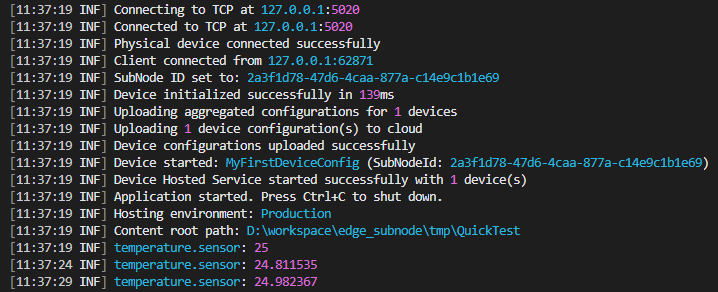
🎉 If the log continuously outputs temperature measurements, it indicates that the template project is running successfully and the device integration is functioning as expected.
Last updated on Jan-16, 2026 | Version 1.0