Install Templates
Learn how to install the two Weda SubNode SDK project templates.
Why Choose WEDA SubNode SDK?
The WEDA SubNode SDK is a .NET 10.0 framework designed to simplify the development of IoT edge nodes that connect physical devices to cloud platforms.
✅ Rapid Development
- 3-minute setup: Create your first project with a single command
- Built-in templates: Pre-configured project structures for common use cases
- Automated configuration: Reduce boilerplate with convention-based defaults
✅ Industrial-Grade Reliability
- Auto-reconnection: Automatic recovery from network interruptions
- Comprehensive error handling: Built-in retry mechanisms and fault tolerance
- Memory-safe: Prevents common memory leaks in long-running processes
✅ Highly Extensible
- Modular architecture: Implement custom protocols via
ICommunicationandIProtocolParser - Multiple development patterns: Choose between Web API or Console App templates
- Configuration-driven: Adjust behavior through
appsettings.jsonwithout code changes
✅ Modern .NET Stack
- .NET 10.0: Latest framework with performance improvements
- Async/await patterns: High-throughput data processing
- Dependency injection: Testable and maintainable architecture
Prerequisites
Before starting, ensure your development environment meets the following requirements:
- Framework: .NET 10.0 SDK or later
- Tools: A code editor (e.g., VS Code, Visual Studio, or Rider)
- Operating System: Windows, macOS, or Linux
- Repository: Clone the WEDA SubNode SDK repository
Install Template
There are two ways to install templates:
1. Using Install Script (Recommended)
Navigate to the SDK repository root and run:
bash scripts/install-templates.sh
Expected output:
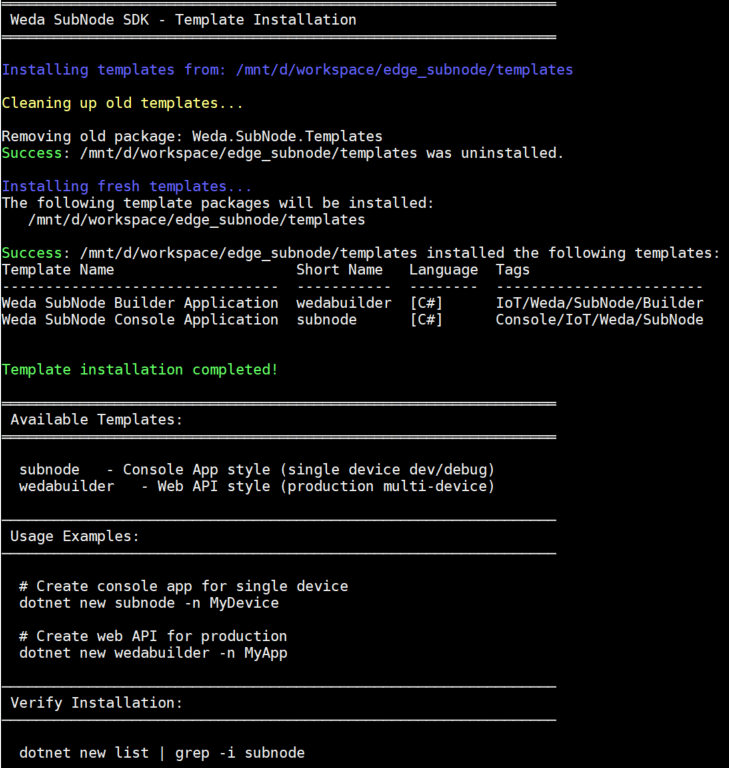
2. Manual Installation
If the script fails, each template can be installed manually:
cd /path/to/edge_subnode/templates

# Install subnode template
dotnet new install ./subnode

# Install wedabuilder template
dotnet new install ./wedabuilder
Verify Installation
Check that all templates are installed:
dotnet new list | grep -i subnode
Expected output:
Template Name                         Short Name   Language  Tags
------------------------------------  -----------  --------  -----------------------
Weda SubNode Console Application      subnode      [C#]      Console/IoT/Weda/SubNode
Weda SubNode Web API Application      wedabuilder  [C#]      Web/WebAPI/IoT/Weda/SubNode
If you see both templates listed, installation was successful! ✅
Uninstalling Templates
To remove all Weda SubNode templates:
dotnet new uninstall Weda.SubNode.Console
dotnet new uninstall Weda.SubNode.WebApi
Template Overview
The WEDA SubNode SDK provides two project templates optimized for different development scenarios:
| Template | Type | Use Case | Key Features |
|---|---|---|---|
| wedabuilder | Web API | Production deployment with multiple devices | Configuration-driven, minimal code, scalable |
| subnode | Console App | Single-device development and debugging | Event-driven, flexible, iterative development |
Template Details
wedabuilder - Web API + Hosted Service
Production-ready architecture for managing multiple devices with RESTful endpoints and background services.
Best for:
- Fastest way to get started with zero code required
- Production environments requiring centralized management of multiple edge devices
- Scalable deployments with RESTful API access
- Configuration-driven development with minimal code changes
Architecture:
- Web API endpoints for device management
- Background hosted services for continuous data collection
- Dependency injection for testability and maintainability
subnode - Console Application
Lightweight template for single-device prototyping with event-driven architecture and easy debugging.
Best for:
- Single-device development: Ideal for development and debugging workflows
- Rapid prototyping and testing
- Single-device custom integrations
- Learning the SDK fundamentals with hands-on control
Architecture:
- Console application with simple entry point
- Event-driven architecture for real-time responses
- Direct access to device communication layer
Next Steps
Now that templates are installed, choose your development path: